Convert Selenium IDE tests to Playwright
Selenium IDE recordings are saved as .side files: JSON lists of commands like open, type, click and assertText. Most Selenium-to-Playwright converters expect WebDriver code, so they cannot read these files. This guide shows how to turn a .side project into a Playwright Test file and what to check afterwards.
On this page: Example · How commands map · Step by step · What to review · FAQ
Example: a recorded sign-in test
Here is a short test as it appears in Selenium IDE:
| Command | Target | Value |
|---|---|---|
store | correct-horse | password |
open | /login | |
type | id=email | kim@example.com |
type | id=password | ${password} |
click | css=button[type=submit] | |
assertText | css=h1 | Welcome back |
verifyElementPresent | linkText=Sign out |
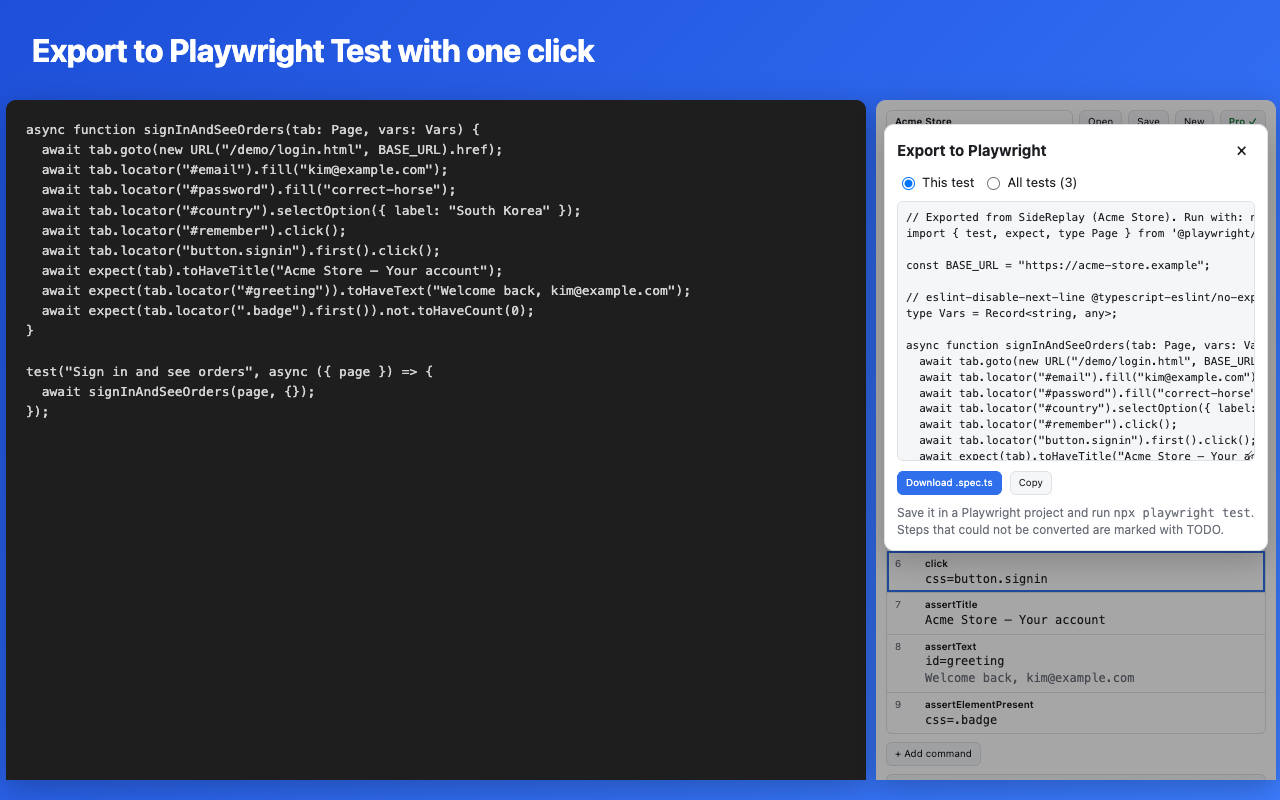
And this is the Playwright Test code SideReplay exports for it (only the header comments are left out):
import { test, expect, type Page } from '@playwright/test';

const BASE_URL = "https://shop.example.com";

type Vars = Record<string, any>;

async function signIn(tab: Page, vars: Vars) {
  vars.password = "correct-horse";
  await tab.goto(new URL("/login", BASE_URL).href);
  await tab.locator("#email").fill("kim@example.com");
  await tab.locator("#password").fill(`${vars.password}`);
  await tab.locator("button[type=submit]").first().click();
  await expect(tab.locator("h1").first()).toHaveText("Welcome back");
  await expect.soft(tab.getByRole("link", { name: "Sign out", exact: true }).first()).not.toHaveCount(0);
}

test("sign in", async ({ page }) => {
  await signIn(page, {});
});
Each test becomes a function, so a Selenium IDE run command (which calls another test) becomes a normal function call, and variables stay shared the same way they were in the IDE.
How Selenium IDE commands map to Playwright
| Selenium IDE | Playwright |
|---|---|
open | page.goto() relative to the project's base URL |
click, type, sendKeys, select, check | click(), fill(), press(), selectOption(), check() |
assert… | expect() — the test stops when it fails |
verify… | expect.soft() — the test keeps going, like in the IDE |
waitForElementVisible and friends | locator.waitFor() or a web-first expect |
store…, ${variables} | a shared vars object and template strings |
if / while / times / forEach / do…repeatIf | real JavaScript if, while, for and do…while |
selectFrame | a frameLocator() chain |
selectWindow, storeWindowHandle | context.waitForEvent("page") and switching the page variable |
assertAlert, acceptConfirmation, answerPrompt | a page.on("dialog") handler with queued answers |
runScript, executeScript | page.evaluate() with variables passed in |
linkText=, id=, css=, xpath= locators | getByRole("link"), #id, CSS and xpath= locators |
Anything that has no direct equivalent is written as a // TODO line with the original command, so nothing disappears silently.
Step by step
- Install SideReplay from the Chrome Web Store and click its toolbar icon to open the side panel.
- Open your .side file with the Open button. Files from Selenium IDE 3.x and 4.x load as they are.
- Run the tests once against your site. If a locator broke since the recording, SideReplay tries the other locators it saved and offers to update the test. Fixing these first gives you cleaner exported code.
- Export with "Export to Playwright". You can export one short test for free to check the output; exporting whole projects is part of Pro.
- Save the file in a Playwright project (
npm init playwright@latest) and runnpx playwright test.
What to review after exporting
- TODO lines. Search for
TODOand convert those steps by hand. - Locators. Recorded XPath and CSS paths work, but Playwright's role-based locators (
getByRole,getByLabel) are more stable. Replace the fragile ones as you touch each test. - Fixed pauses.
pausebecomeswaitForTimeout. Playwright waits automatically, so most pauses can be deleted. - Base URL. Move
BASE_URLintoplaywright.config.tsif you run against several environments.
A good plan for big suites: export everything, get the most-used tests green in CI first, and keep running the rest from the .side file in SideReplay until each one is migrated.
Add SideReplay to Chrome
FAQ
Does it work with Selenium IDE 4 files?
Yes. SideReplay reads files saved by Selenium IDE 3.x and 4.x and converts old command names automatically.
Can I export to Cypress or Selenium WebDriver instead?
Not yet. Playwright Test (TypeScript) is the only export target today.
Is my code or test data uploaded anywhere?
No. The conversion runs inside your browser. See the privacy policy.